Create a branded car shipping quote form in one click, put it on your website, and every submission lands in your CRM as a lead within a second — tagged with the channel that produced it, and ready to convert into a quote without anyone retyping a field.
Every auto transport company already pays for traffic: Google Ads, Facebook, a Google Business listing, a website someone built two years ago. What most brokerages do not have is anything waiting at the end of it. A mailto: link, an inbox, and a lead that goes cold overnight is not a lead capture system — it is a hope. Lead Capture closes the ninety seconds between a visitor deciding to ask for a quote and your team being able to answer it.
How it works
From ad click to signed order, without retyping
Three steps to set up, and then nothing to maintain. The form page is generated by the CRM, so it is always current and there is no template for anyone to break.
1. Create the form
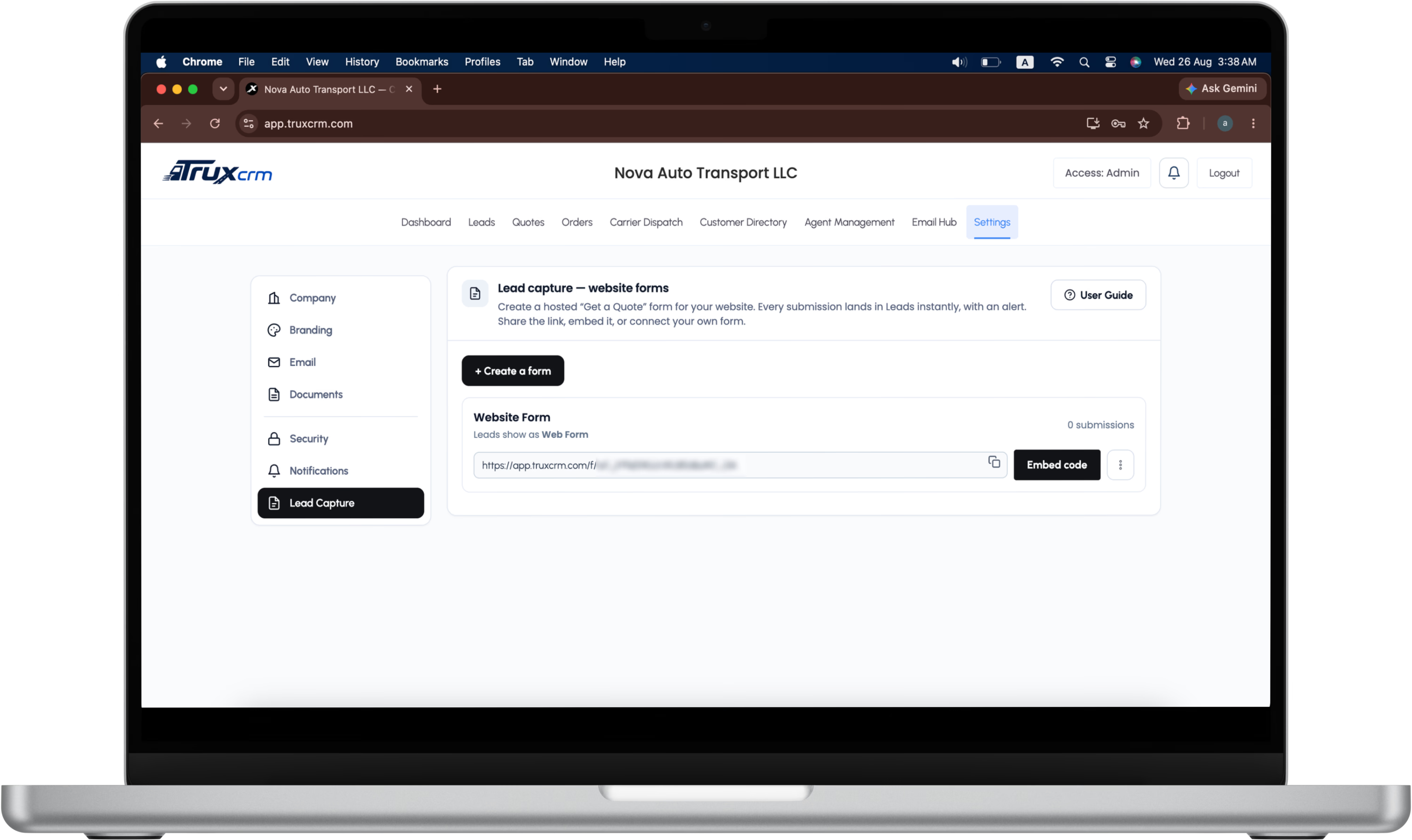
In Settings, click Create a form and name it after the place you will advertise it — Facebook, Google Ads, your home page. You get a hosted page at your own link, carrying your logo, brand colour, phone number and MC and USDOT numbers.
2. Put it on your website
Paste one line of embed code into your site, link a button to it, or keep your designer's existing form and post it to our endpoint. Works on WordPress, Wix, Squarespace, Shopify and plain HTML.
3. Convert it
The submission becomes a lead instantly, your team is alerted, and one click opens a quote with the customer, route, vehicle and ship date already filled in. From there it is the same order and dispatch flow you already run.
Settings → Lead capture. One button creates the form, and the link beside it is the one you embed, share or point an ad at. The form ID is hidden here because it is a live address.
The form
Six fields, because the seventh costs you a lead.
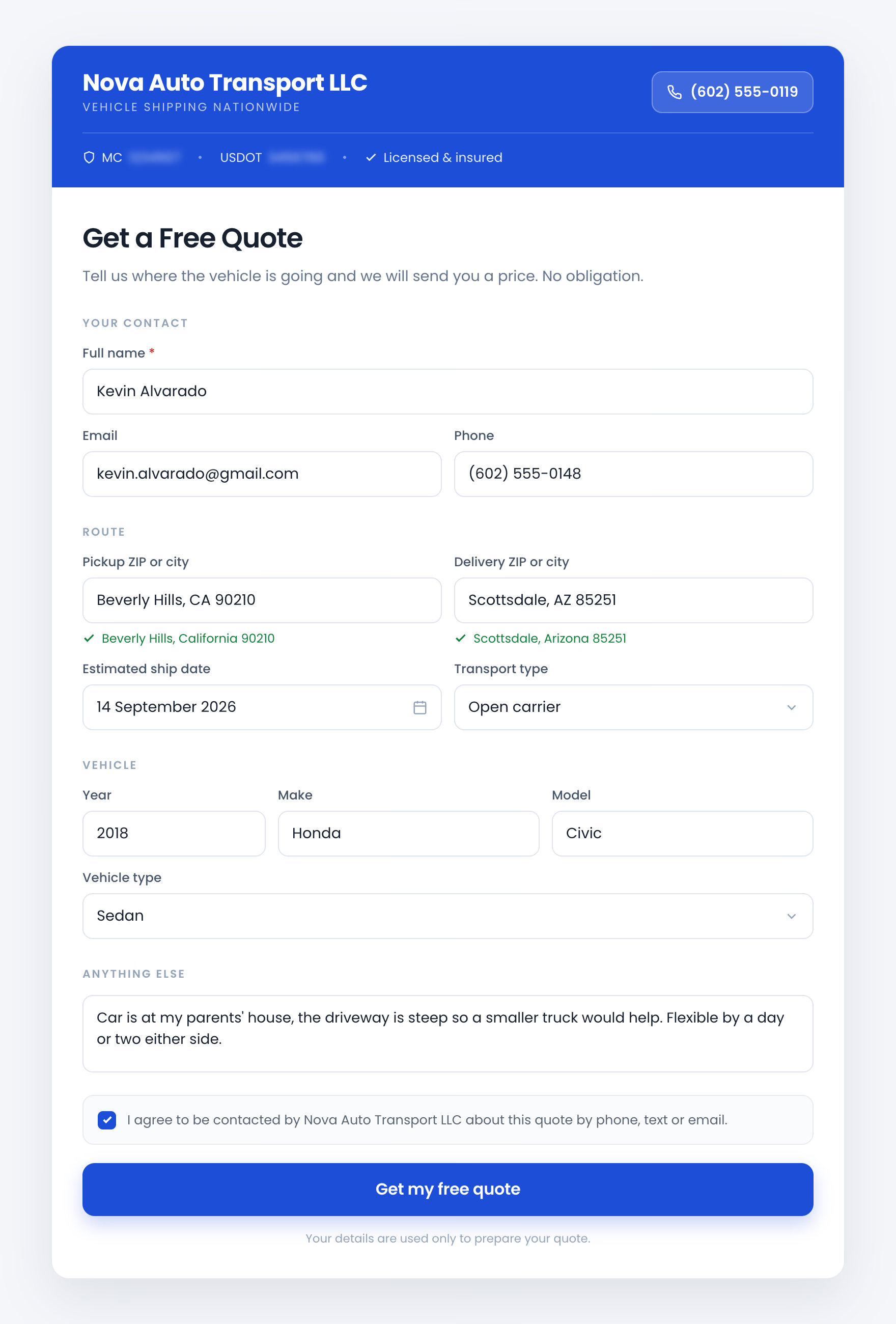
Every extra box on a car shipping quote form costs submissions. This one asks for exactly what a broker needs to quote, and nothing else.
Who
Full name, email and phone. Name is required, and either an email or a phone number.
Required
Route
Pickup and delivery, entered as a ZIP code or a city, plus an estimated ship date.
ZIP autofill
Vehicle
Year, make, model, vehicle type, and open or enclosed transport.
Carried to the quote
Notes
Free text for anything that does not fit a field, plus a contact-consent checkbox recorded with a timestamp.
Optional
ZIP autofill
Type 90210 into pickup and the form completes it to Beverly Hills, CA 90210 with a green confirmation line. The visitor sees one tidy box; the CRM quietly stores city, state and postal code as separate pieces, so the quote's City, State and Postal Code fields fill in exactly rather than receiving one string dumped into one box. Type free text instead and nothing breaks — the CRM keeps what was typed.
Built for a phone
Most quote requests arrive on a phone, so the form is single column below 520px, uses 16px inputs so iOS does not zoom on focus, opens the native date picker for the ship date, and sizes every tap target for thumbs.
Installation
Three ways to add a quote form to your website
Each form's Embed code dialog gives you all three, with copy buttons and per-platform instructions. Open the one that matches how your site is built.
Embed it in your pageMost common — the form appears inside your existing quote page
Paste this where you want the form to appear. It is one line, it loads nothing from anywhere else, and it needs no plugin.
<iframe src="https://app.truxcrm.com/f/wf_xxxxxxxx" title="Get a Quote" loading="lazy" style="width:100%;max-width:660px;height:920px;border:0;border-radius:14px"></iframe>
WordPress
Edit the page, add a Custom HTML block.
Paste the embed code and update the page.
If your theme uses the classic editor, switch to the Text tab first.
Wix
Click Add → Embed → Embed a Widget.
Choose Enter Code and paste the embed code.
Drag the box until it is tall enough that the form does not scroll inside itself.
Squarespace
Add a Code block to the page.
Paste the embed code and turn off Display Source.
Shopify
Open the page in the admin and switch the editor to HTML using the <> button.
Paste the embed code and save.
On a successful submission the form posts a message to the page around it, so your own site can react — fire a conversion pixel, show a thank-you overlay, or redirect.
Link a button to itFor ad destinations, an Instagram bio, an email signature or a QR code
The form has its own address, so anything that can hold a link can hold your quote form.
<a href="https://app.truxcrm.com/f/wf_xxxxxxxx">Get a Free Quote</a>
Point a Google Ads or Facebook campaign straight at it and skip the landing page entirely. Print it as a QR code on a business card. Put it under your name in every email your team sends.
Post your own form to usKeep the form your designer built and send its submissions to the CRM
Send JSON or form data to /api/public/lead/<form-id>. This is the same pipeline the hosted form uses, so everything below — attribution, validation, deduplication, alerts — behaves identically. There are two ways to call it, and which one you want depends on whether your form runs JavaScript.
With JavaScript — recommended for a designed form
POST JSON with fetch from your own domain, read data.success off the response, and show your own inline confirmation. The visitor stays on your page and never sees ours. Cross-origin requests are supported — the endpoint answers with Access-Control-Allow-Origin: * and handles the OPTIONS preflight for Content-Type — so there is no proxy, relay or server-side workaround to build.
const res = await fetch("https://app.truxcrm.com/api/public/lead/wf_xxxxxxxx", {
  method: "POST",
  headers: { "Content-Type": "application/json" },
  body: JSON.stringify({
    full_name: "Jane Doe",
    email: "jane@example.com",
    origin: "90210",
    destination: "33101"
  })
});

const data = await res.json();
if (data.success) {
  // Your own confirmation. The visitor never leaves your page.
}
Without JavaScript
Point a normal <form method="post"> straight at the endpoint and let the browser submit it. The visitor is shown a branded thank-you page rather than raw JSON. Add a hidden redirect_to field if you would rather return them to a page on your own site.
email and phoneOne of the two is required. Email format is checked server-side.
origin and destinationOptional. A ZIP code is resolved to city and state; anything else is kept as typed.
ship_dateOptional.YYYY-MM-DD, validated as a real calendar date.
vehicle_year, vehicle_make, vehicle_modelOptional. Carried through to Vehicle 1 on the quote and the order.
vehicle_type and transport_typeOptional. Restricted to known values, so a typo cannot enter the CRM.
notesOptional. Free text, length-capped on the server.
redirect_toOptional. Only for plain form posts. A path or URL on your own domain to return the visitor to. Values pointing anywhere else are rejected.
There is no company field in that list, and that is deliberate. The brokerage is derived only from the form ID in the URL, so a submission can never be aimed at another company's CRM.
Attribution
Which ads actually pay, not which ads get clicks.
This is the part most CRMs get wrong. Knowing you got forty leads is not useful. Knowing that the twelve from Google Ads produced three signed orders and the twenty-eight from Facebook produced none — that decides where next month's budget goes.
Create one form per place you advertise. The form's name becomes the lead's Source, and critically, that label stays on the record: it carries from the lead into the quote's Referral Source, and from the quote into the order's Source. So the question stops being "which channel gets submissions" and becomes which channel gets signed orders — and the CRM can answer it without a spreadsheet.
Forms can be renamed at any time. Renaming affects only leads captured afterwards, so historical reporting stays truthful, and the link never changes — anything already embedded on your website keeps working.
Form
Facebook
→ Web Form · Facebook
Form
Google Ads
→ Web Form · Google Ads
Form
Instagram
→ Web Form · Instagram
Form
Home page
→ Web Form · Home page
Each form also shows its own lifetime submission count and last-used time, so a channel that has quietly stopped producing is visible before the invoice arrives.
The moment it lands
What happens the second someone submits
Everyone is told
The lead is pushed to every logged-in user through a live event stream: the Leads badge increments and a toast appears with no refresh. It is also written to a durable notifications table, so it survives a reload, a closed laptop or an offline phone. Install the CRM as a mobile app and it arrives as a locked-screen push.
A complete lead record
Customer, route, vehicle, transport type, notes, ship date, the structured route parts, the form's name as its Source, and a tracking ID such as NV00042 that will follow this customer all the way to a signed order.
A consent record
Whether the visitor ticked the contact-consent box, the timestamp, their IP address and the page they came from are all stored — the evidence you want on file if a customer ever disputes having asked to be contacted.
Handoff
Nobody retypes anything
Lead Capture is the front door of a pipeline that is already built. Everything the customer typed on your website travels with the record.
Route
Beverly Hills, CA 90210 becomes City, State and Postal Code as three separate fields on the quote, then the pickup location on the order.
Lead → Quote → Order
Date
The customer's estimated ship date fills the quote's required Ship Date, and becomes First Available Date on the order.
One less thing to chase
Source
Web Form · Facebook becomes the quote's Referral Source and then the order's Source, so revenue traces back to the ad that produced it.
Survives the whole pipeline
Vehicle
A 2018 Honda Civic entered on your website is Vehicle 1 on the quote and Vehicle 1 on the order.
Typed once
ID
One tracking ID identifies the customer from first click to signed contract.
Example: NV00042
Where the form could not resolve something — a visitor typed "somewhere near LA" instead of a ZIP — the CRM carries the raw text across rather than guessing. Nothing is lost and nothing is invented. See how the rest of that pipeline works on the features page, or read why broker fee and carrier pay belong on the same record.
Abuse protection
A public form that does not fill your Leads list with junk
A public URL that writes to a database is a target. Lead Capture is layered so that no single trick gets through, and a real customer never sees any of it. Everything below is on by default.
Rate limits and daily caps
Twelve submissions per IP address per ten minutes, and at most two hundred per form per day. Generous for a person, tight for a script. A flood hits the cap rather than your Leads table, and the visitor is told to call instead.
Honeypot and timing checks
A hidden field only an automated form-filler completes, and a check on how fast the form came back — under two seconds is not a human typing. Both get a success response and are silently dropped, so the bot never learns it failed.
Server-side validation
Every field is re-validated and length-capped on the server, not just in the browser. Name required, email or phone required, email format checked, vehicle and transport types restricted to known values, ship date checked as a real calendar date.
Duplicate merging
The same email or phone submitting again within twenty-four hours updates the existing lead, filling blanks and appending a note, rather than creating a second row. Two agents never work the same person twice.
Tenant isolation
The brokerage is derived only from the form ID in the URL. There is no company field a caller can supply, so a submission can never be aimed at another company's CRM. The table is server-only, and row-level security blocks anonymous access outright.
Fail closed
A revoked form, a suspended account, an expired licence or a disabled feature all render as an ordinary "form not available" page. Never an error that tells someone probing you that something exists.
No open redirect
The optional redirect_to field is resolved against the submitting site's own origin and rejected if it points anywhere else, so the endpoint cannot be used to bounce a visitor to a phishing page.
The form loads no third-party scripts, no analytics and no fonts from a content delivery network. It talks only to its own origin. Read more about how the platform is separated on the security page.
Day to day
Managing your forms
Unlimited forms
One per channel, one per campaign, one per landing page — however you want to slice your reporting. Active forms are listed with their link, an inline copy button, their embed code and their submission count.
Pause, rename, delete
Pausing is reversible and deletes nothing; paused forms collapse behind a toggle so the active list stays clean. Deleting is permanent and clearly flagged as such. Leads already captured are always kept either way — they belong to your Leads section, not to the form.
Included, with no add-on fee
Lead capture comes with the one TruxCRM plan at no extra cost, and you can create as many forms as you want. There is no separate tier to buy and nothing here is held back for a bigger package. See what the plan costs on the pricing page, or ask us to walk through it on your demo call.
Common questions
Lead capture questions
How do I add a quote form to my auto transport website?
Create a form in TruxCRM Settings, open its Embed code dialog, and paste the one-line iframe into your page. There are per-platform instructions for WordPress, Wix, Squarespace and Shopify in the dialog itself. If you would rather not touch your site's code, link a button to the form's own address instead.
How fast do leads reach the CRM?
Within a second. The lead is pushed live to every logged-in user, so the Leads badge increments and a toast appears without anyone refreshing. It is also stored in a notifications table, so a user who was offline still sees it when they come back, and installed mobile apps get a locked-screen push.
Can I keep the form my web designer already built?
Yes. Post your existing form's fields as JSON or form data to the public lead endpoint and it runs through the same pipeline as the hosted form, with the same validation, deduplication, attribution and alerts. Your form keeps its own design and your CRM still gets a clean lead. Cross-origin browser requests are supported, so your developer can post it with JavaScript straight from your own site and keep the visitor on the page — no relay, proxy or Cloudflare Worker required.
How do I tell which ads are producing signed orders?
Create one form per place you advertise and name it after that channel. The name becomes the lead's Source, and that label carries into the quote's Referral Source and then the order's Source. Because it survives the whole pipeline, you can see which channel produced revenue rather than which channel produced submissions.
Will bots fill my Leads list with spam?
Rate limits, a honeypot field, a timing check, server-side validation, a daily cap per form and duplicate merging are all on by default. Bots that trip the honeypot or the timing check are given a success response and silently dropped, so they never learn to try something else. None of it is visible to a real customer.
How many forms can I create?
As many as you want. Most brokerages run one per advertising channel plus one on the website itself. Each form tracks its own submission count and last-used time.
What happens if I rename or delete a form?
Renaming affects only leads captured after the change, so historical reporting stays truthful, and the link itself never changes, so anything already embedded on your website keeps working. Deleting stops the link working everywhere it is embedded, but leads already captured are always kept.
Does the customer's email address get verified?
The format is validated on the server, and the customer supplies either an email or a phone number. Whether your reply to that address reaches their inbox is a separate question, and it depends on your own sending domain — see the email setup guide and our article on why broker quotes land in spam.
Is lead capture included in the price?
Yes, at no extra cost. Lead capture is part of the one TruxCRM plan, with unlimited forms, and there is no add-on fee and no higher tier to reach for it. Full pricing is on the pricing page.
What about leads I buy from a provider?
Those come in through the lead provider API instead: you give each vendor its own key and their leads arrive tagged with the vendor, de-duplicated against retries, and silent rather than notifying you. Forms cover the leads you earn; keys cover the ones you buy.
Can I bring in the leads I already have?
Yes. An admin can import a lead list from a CSV file — a spreadsheet, or an export from the CRM you are leaving. Every row is checked before anything saves, duplicates are skipped, and the leads arrive ready to assign in bulk or split evenly across your agents.
Stop losing leads to an inbox.
See the hosted form, the embed dialog and a live submission landing in the Leads list, then follow it to a quote, a Central Dispatch posting and a signed order, on your own workflow rather than a canned demo.