
1. Connect your account
Connect your brokerage's Central Dispatch account to TruxCRM once. It is your account and your subscription. TruxCRM works through it rather than replacing it.

TruxCRM is an official Central Dispatch partner. Connect your Central Dispatch account once, then search Central Dispatch and post loads from the order you already saved. The price, the dates, the vehicles and the route come across from the order, so nobody types a load twice.
Most brokers post the same way. The order is open in one tab, Central Dispatch in another, and the details get typed across by hand. It works until it doesn't: a carrier price keyed in from the wrong order, a first available date that was true on Monday, a board note with the customer's gate code in it for every carrier to read. And once the car is booked, a listing still up and still collecting calls. Posting from the order takes the retyping out, and most of those mistakes go with it.
Posting reads the saved order, so save your changes first and the listing picks them up.
Connect your brokerage's Central Dispatch account to TruxCRM once. It is your account and your subscription. TruxCRM works through it rather than replacing it.
Click Post to CD on the order. The listing opens already filled in: price to carrier, first available date, carrier payment terms, the vehicles and both ends of the route. Add a deliver-by date or notes if you need them, then read the summary of exactly what will be sent.
Post, and the listing number, who posted it and when stay on the order, along with the listing's status and the last time it was checked. Refresh checks again whenever you want to know where it stands.
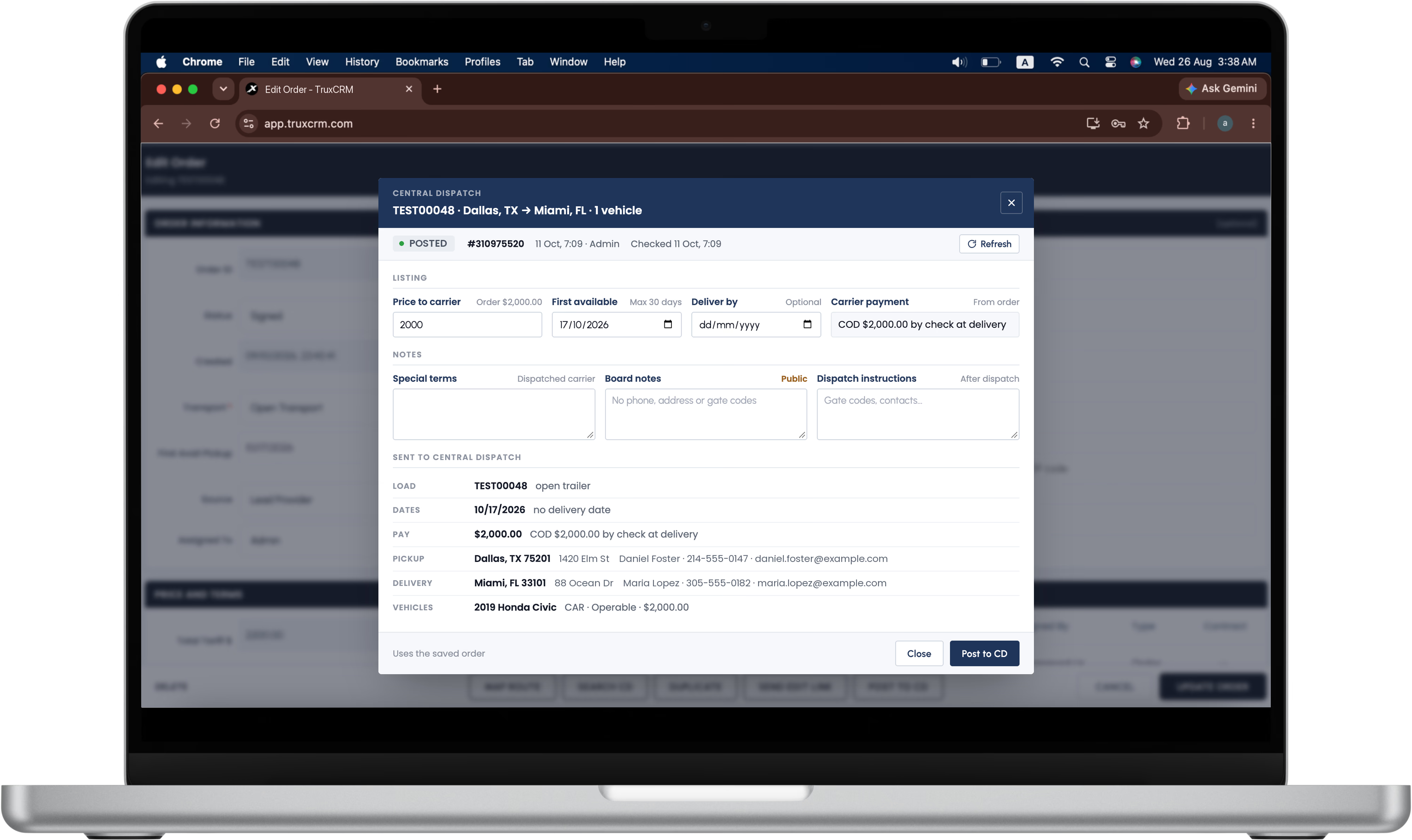
Most of a Central Dispatch listing is already on the order, so most of it is filled in for you. The fields you do touch are the ones that need a decision.
| Field | Where it comes from | Worth knowing |
|---|---|---|
| Price to carrier | Filled in, with the order's amount shown beside it | You see both numbers before anything is posted, so a typo is caught here rather than by a carrier. |
| First available | You set it | The field allows up to 30 days ahead. Use the date the car is genuinely ready. |
| Deliver by | Optional | Leave it empty unless the customer has a real deadline. An invented one narrows the carriers who will call. |
| Carrier payment | From the order | Terms such as COD by check at delivery come from the order, so the board and your records say the same thing. |
| Special terms | You write them | For the carrier you dispatch. |
| Board notes | You write them | Public. Every carrier browsing the board can read them. |
| Dispatch instructions | You write them | For after dispatch: gate codes, contacts, anything the driver needs on the day. |
| Load, vehicles, pickup and delivery | From the order | Trailer type, each vehicle's year, make and model, whether it runs, and the pickup and delivery city and ZIP. |
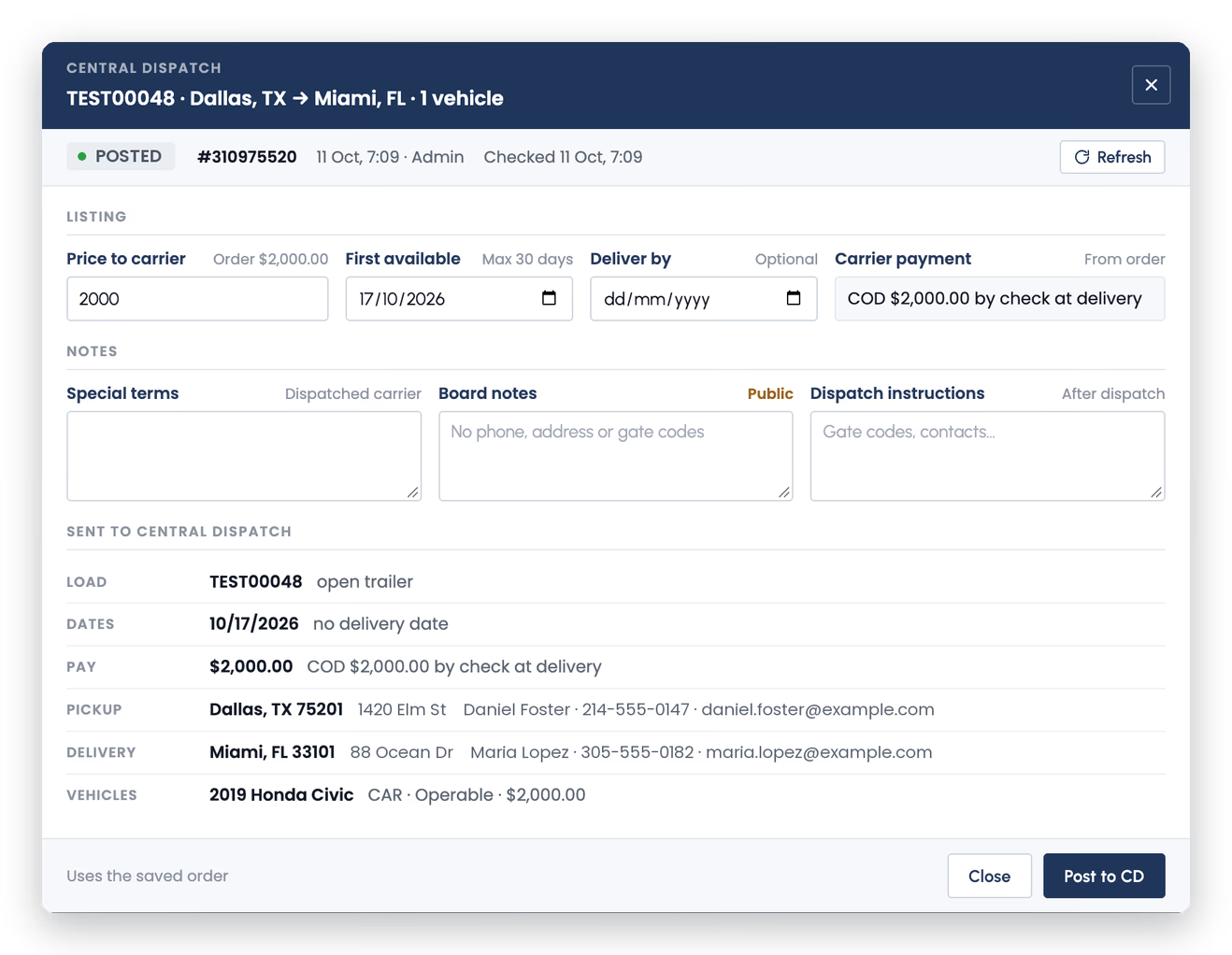
This is the part of posting that catches people out, and it is why the window has three boxes rather than one.
Board notes are public. Anyone browsing Central Dispatch can read them, so they are for what helps a carrier decide to call: a narrow street, a car that sits low, a pickup window that matters. The box itself says it: no phone numbers, no addresses, no gate codes.
Special terms are for the carrier you dispatch. Conditions of the job that you want agreed before the truck turns up.
Dispatch instructions are for after dispatch. This is where the gate code, the customer's direct number and the "ask for Mike at the service desk" belong. It is the box people most often skip, and then the same details end up in the public notes instead.
A useful habit is to write the dispatch instructions first. Once the private details have somewhere to go, they stop leaking into the public box.
The listing stays tied to the order. Its status, the Central Dispatch listing number, who posted it and when are on the record, together with the last time TruxCRM checked the listing. A listing that is posted shows as posted, and one that has been taken down shows as removed, so a glance at the order tells you whether the car is still on the board. Refresh checks again on demand.
When a carrier calls and you book them, the carrier, the driver and their insurance go on the same order, next to the quote, the signed order and the invoice. Carrier pay and your broker fee stay as separate figures, which is what lets you read the margin on every car. Before you hand a car over, run the checks in how to vet an auto transport carrier; finding a carrier on the board is not the same as knowing the carrier is covered.
The same order also lets you search Central Dispatch, see the route on a map, and add vehicles by VIN, so the work around a posting happens in one place too.
Two subscriptions, and only one of them is ours.
Paid to Central Dispatch, as it is whichever CRM you use. Central Dispatch publishes its Core shipper plan at $139.95 a month; the rest of a brokerage's software bill is priced in what auto transport broker software costs.
The Central Dispatch connection is included, with no per-post fee. TruxCRM is one plan with every feature: $120 to $150 a month for up to five agents, then $20 per extra agent. See the pricing page for the worked example.
TruxCRM is not the only broker CRM that connects to Central Dispatch. BATS, Cronetic, ProABD and CargoFlare's Professional plan all post to it in one form or another, and our comparison of nine auto transport CRMs sets out what each one costs at two, five and ten agents, with every price linked to its source.
Where TruxCRM differs is everything around the posting. The lead that came in from your website or a lead provider, the quote, the e-signed order, the listing, the carrier, the invoice and the payments are one record, on one plan, with nothing held back for a bigger tier. If your Central Dispatch posting lives in one system and the rest of the job in another, that is the gap this closes.
Yes. TruxCRM is an official Central Dispatch partner. Brokers connect their own Central Dispatch account, then search Central Dispatch and post loads from the order inside TruxCRM.
With TruxCRM, yes. Open the order and click Post to CD. The listing is filled in from the saved order, including price to carrier, first available date, carrier payment terms, vehicles, pickup and delivery, and you see a summary of exactly what will be sent before you post.
Yes. The Central Dispatch subscription is paid to Central Dispatch, as it is with any CRM. TruxCRM connects to your account and does not replace it. Central Dispatch publishes its Core shipper plan at $139.95 a month.
No. The connection is included in the TruxCRM plan, which is $120 to $150 a month for up to five agents with every feature, and there is no fee per post.
It depends on the box. Board notes are public, so any carrier browsing Central Dispatch can read them; never put phone numbers, addresses or gate codes there. Special terms are for the carrier you dispatch, and dispatch instructions are for after dispatch, which is where gate codes and contacts belong.
The order shows the listing's status, its Central Dispatch number, who posted it and when, and the last time TruxCRM checked it. A listing that has been taken down shows as removed. Refresh checks the status again at any time.
Several broker CRMs connect to Central Dispatch, including BATS, Cronetic, ProABD and CargoFlare on its Professional plan. TruxCRM's difference is that the posting sits on the same record as the lead, quote, signed order, carrier, invoice and payments, on one plan with every feature.
In a free demo we walk through posting one of your lanes to Central Dispatch from TruxCRM, then show the carrier, the invoice and the payments landing on the same order.